
Part 1 · for Matt
1What a distributor sees and does
Each distributor has their own private page, branded to Dock Blocks. From there, ordering is three steps: get the document, fill it in against the rules on the page, and upload it.
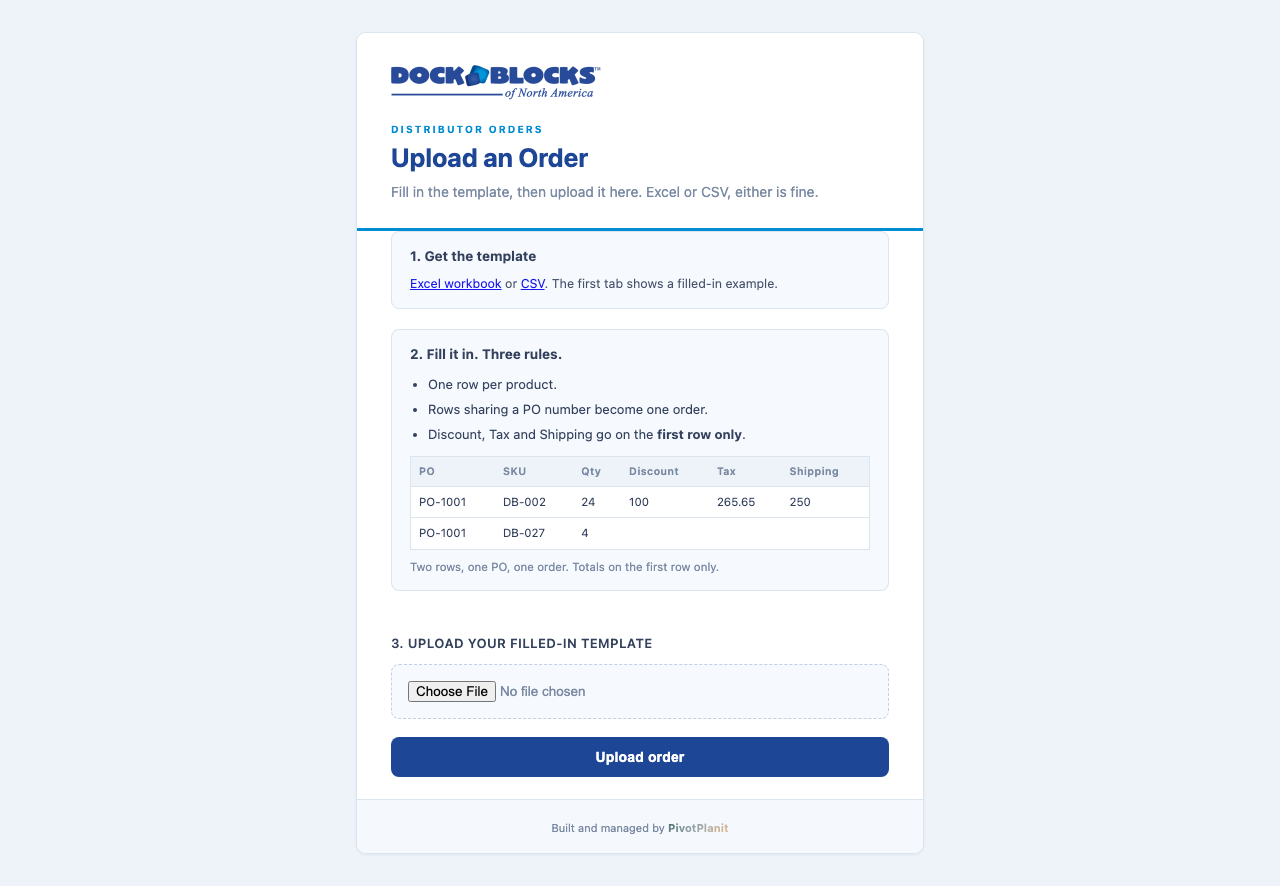
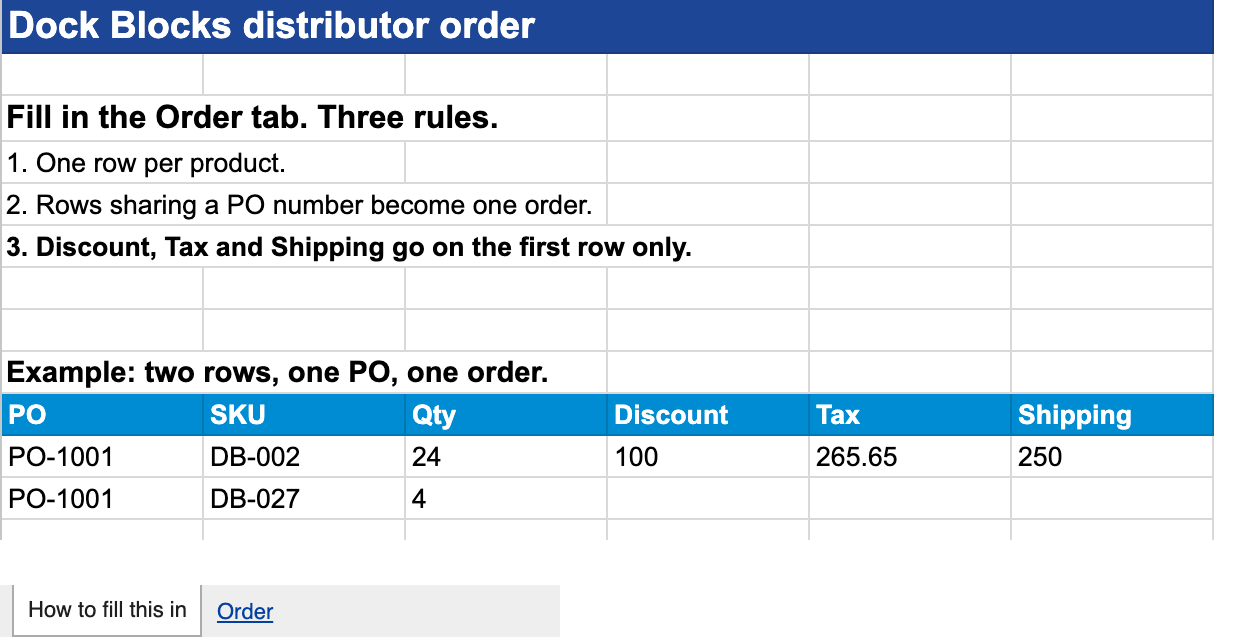
The page tells them exactly what a good order looks like before they ever upload one, and links straight to the document they need to fill in.
2What it refuses before anything reaches Zoho
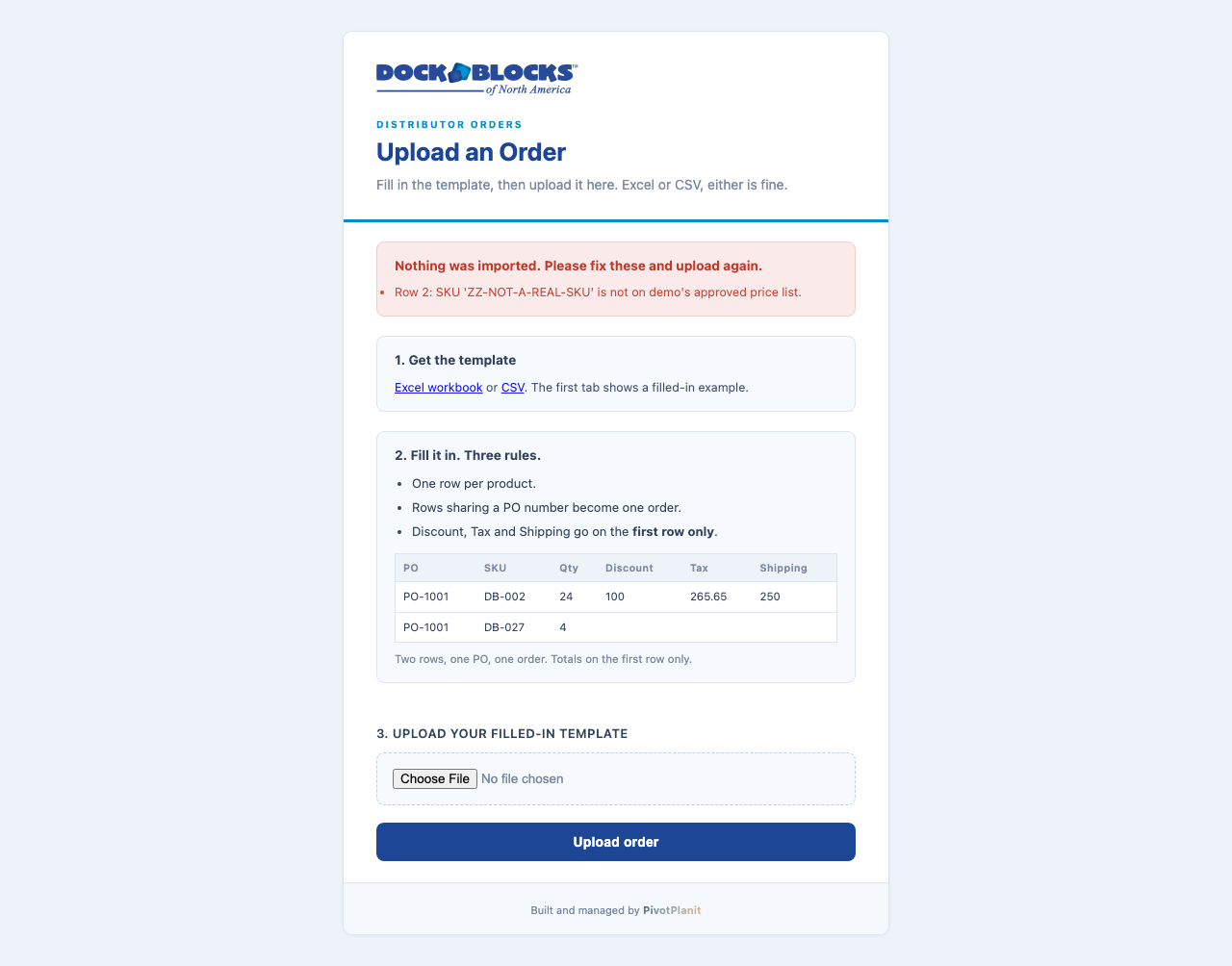
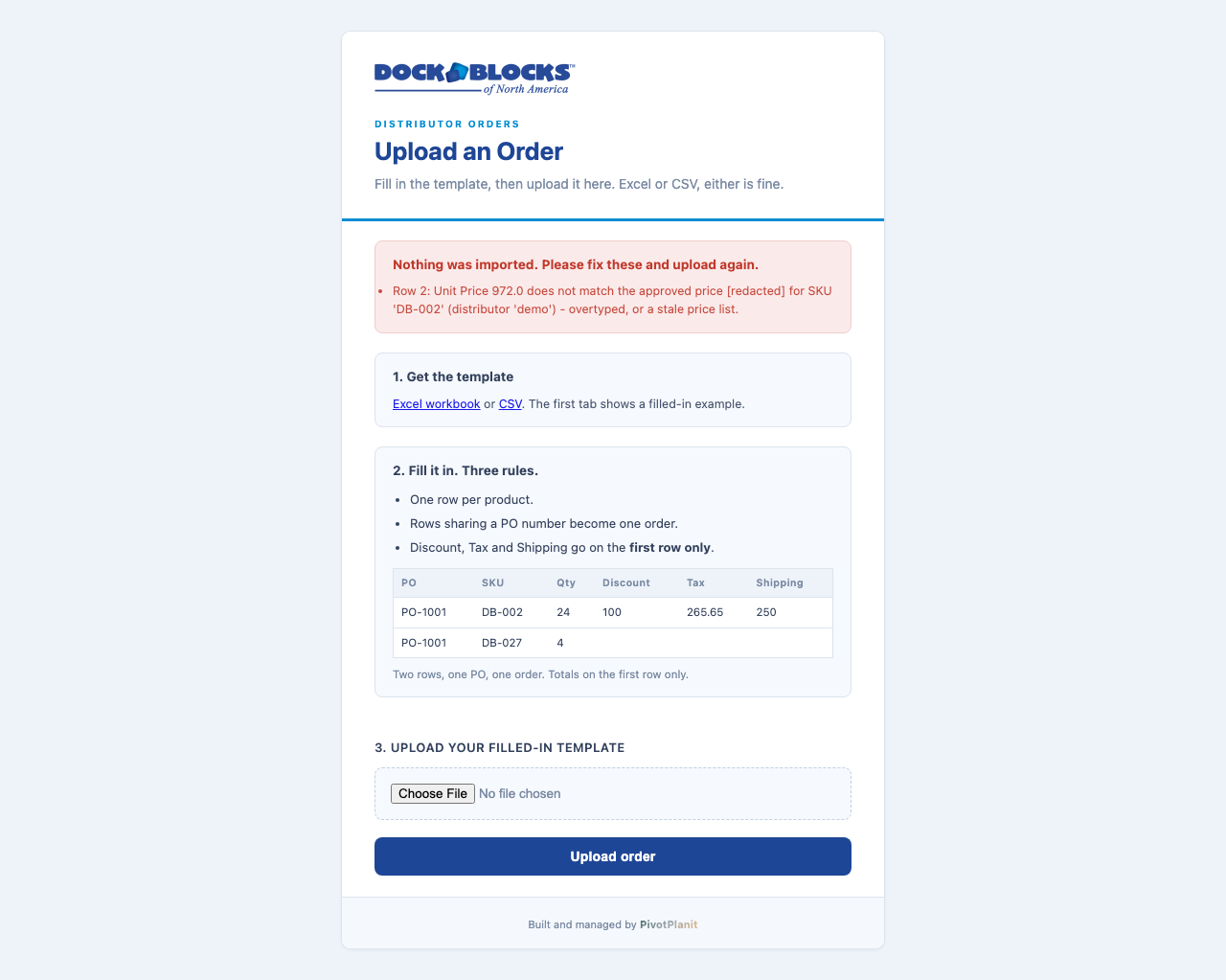
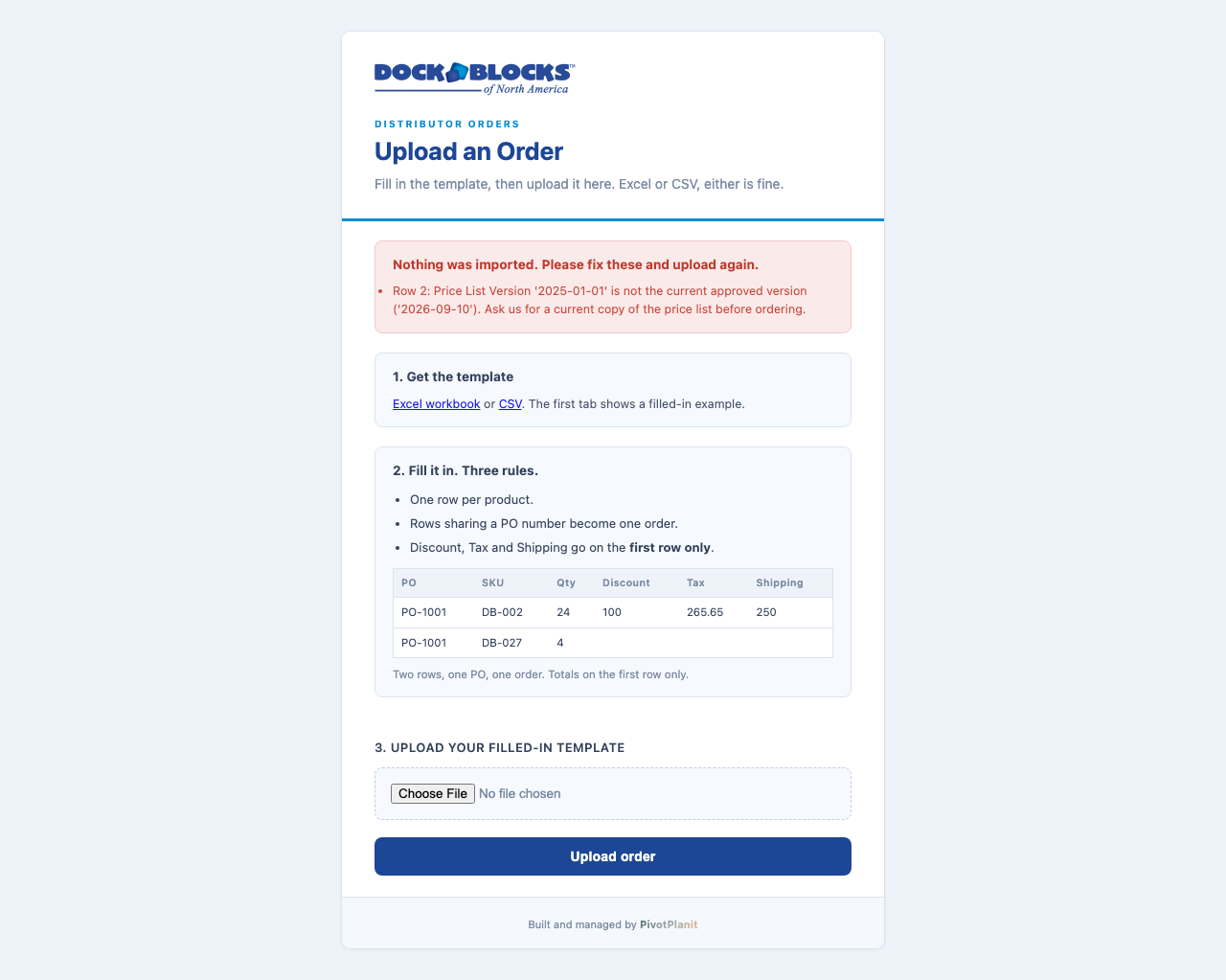
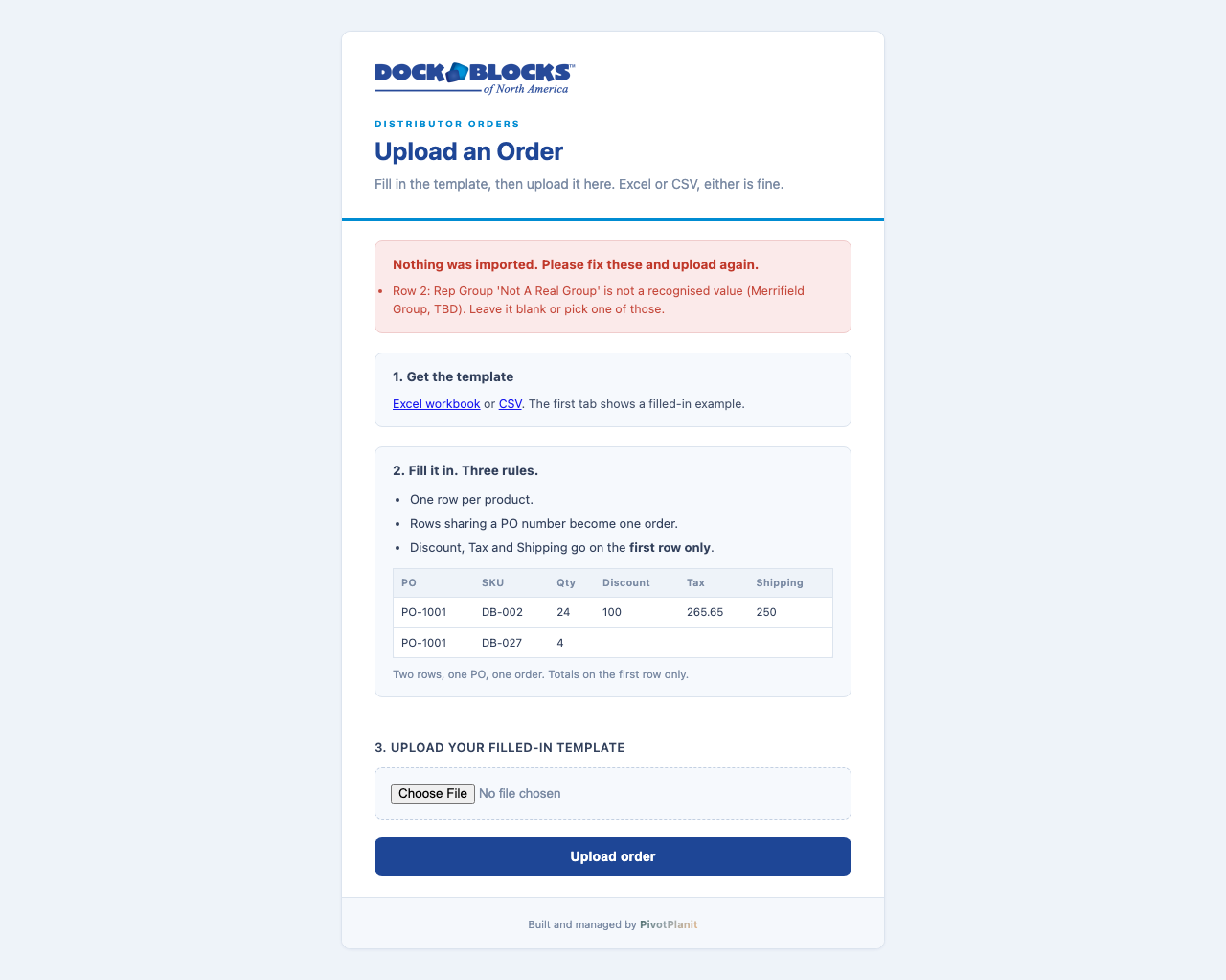
Four things stop an order before it ever becomes a Zoho record. This is the guarantee behind the whole system: a bad order cannot get in.
3What lands in Zoho
An accepted order becomes a Zoho order the same shape as a Shopify order, so it runs through the same fulfillment and reporting.
- Every line item, at the price on the approved list.
- Dock kits arrive broken into the individual parts your warehouse actually ships, priced correctly and with the total exact to the cent.
- The distributor’s rep group rides along on the order, which is what feeds the Ambassador Program.
4The end customer
The person the distributor sold to gets the same three touches a Shopify buyer already gets: order received, order shipped, and the PRO tracking number.
5Adding the next distributor
Growth here does not mean a project. Adding a distributor is now something George does himself, on a page, in a few minutes.
Until this week, adding a distributor meant a developer editing a file, generating a key by hand, and redeploying the service. That is why it could never be a routine task: it was a release. It is now a form.
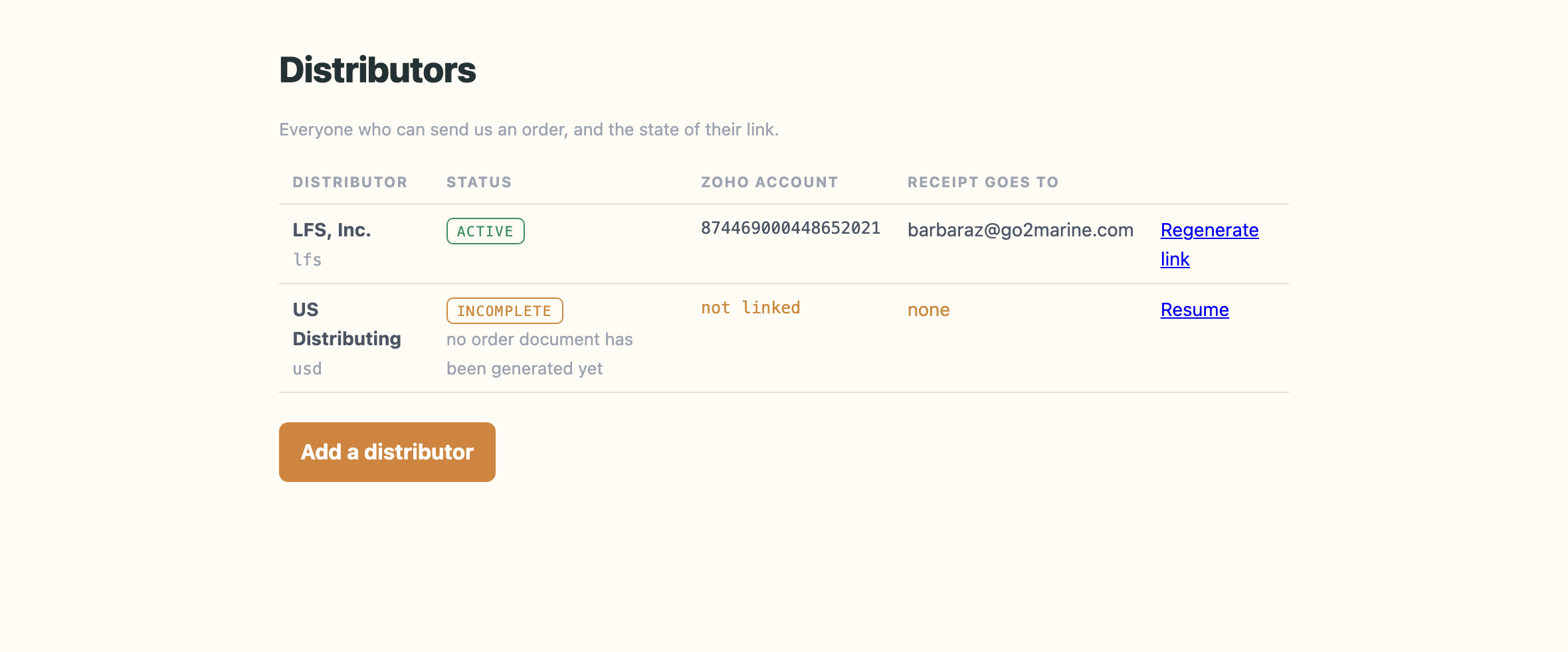
A half-finished setup shows as incomplete and says which part is missing, rather than sitting on the list looking the same as a finished one. George picks it up where he left off; he never starts again.
Part 2 · for George
6Setting a distributor up
Five steps, once, per distributor. Nothing is created until you have confirmed it is the right company.
First, signing in
Your board lives at dockblocks-distributor.pivotplanit.com/distributor/admin/. Open it and you are asked to sign in: put in your Dock Blocks address, Cloudflare emails you a code, you paste the code and you are through. There is no password to remember and nothing to keep safe. Signing in lasts a day, so in practice it asks once each morning.
Use that address, not the one your distributors use. Theirs stays as it is and never asks anyone to sign in, because the private link in their email is what identifies them. Yours always asks, because the board shows every distributor at once.
If the code does not arrive, check junk before anything else. It comes from Cloudflare, not from Dock Blocks.
Then, the five steps
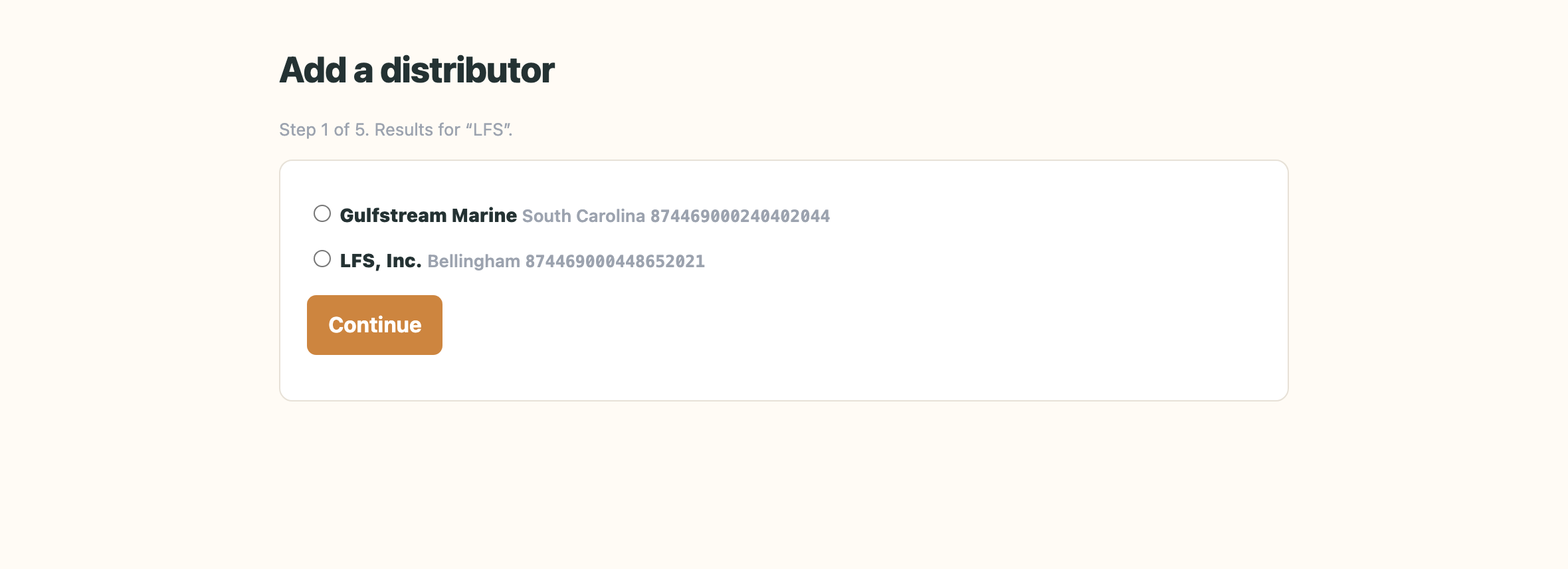
That last point is deliberate. Searching Zoho accounts for “LFS” returns Gulfstream Marine, because those three letters appear inside the word. A typed account number looks right and quietly attaches every order to the wrong company, so the system will not accept one.
- 1. Who. Search Zoho and pick the company.
- 2. Review. Nothing is created yet. This is where a wrong pick gets caught.
- 3. Create. The link is generated, the record is written, and their order document is built at today’s approved prices.
- 4. Check. Five checks against the running system, covered in the next section.
- 5. Hand off. The email to send them, ready to forward.
7Checking it works, and handing it over
Before the link goes out, the system proves the link works. It does not take the previous step’s word for it.
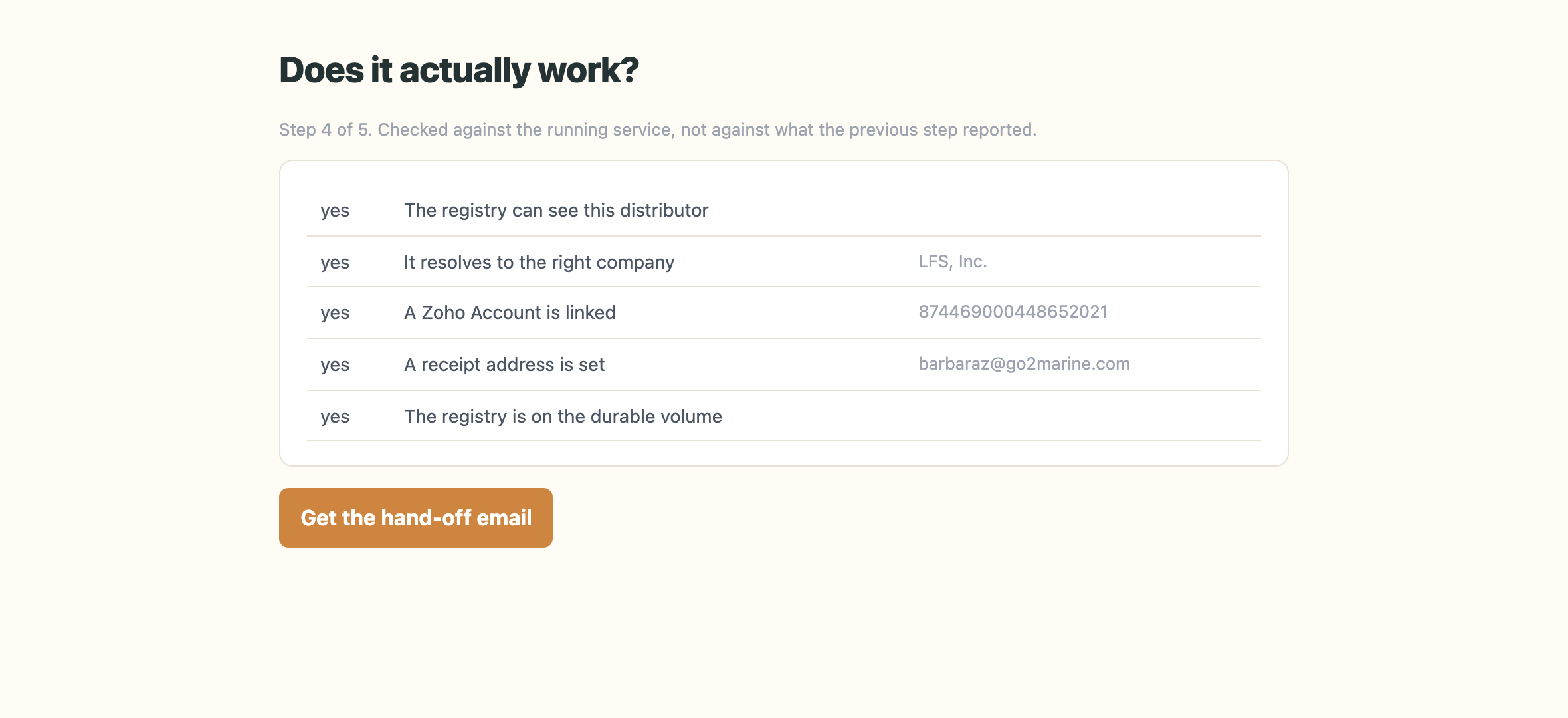
The distinction matters more than it sounds. A setup screen that confirms its own work will happily report success on a link that does not open, because it is reading back what it just wrote. These five checks go the other way round: they ask the running system to resolve the new link exactly as the distributor’s browser will, and any no stops the hand-off.
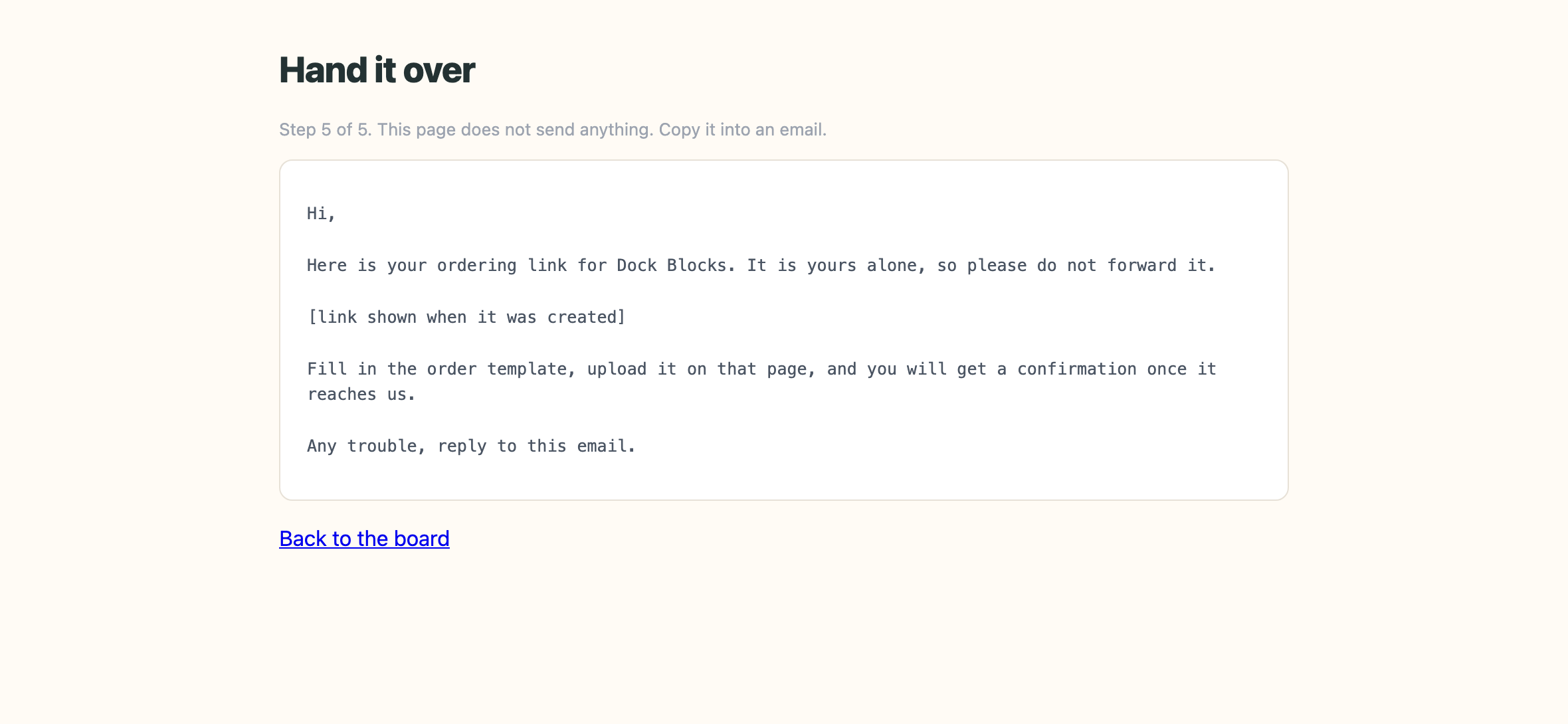
Once every check passes, the last step writes the email to send: their own copy of the order document, priced to today’s approved list, and their own private link. It is rendered from the real link and the real price-list version, and it waits for George to send it. Nothing is emailed automatically.
8What you see when an order lands
You, Matt, and the distributor all get the same confirmation the moment an order is created: who sent it, which purchase order, and how many lines.
In Zoho, it is a Sales Order carrying their purchase order number, priced and lined out exactly as they submitted it, ready to work the way you already work a Shopify order.
9When something is refused
The distributor sees exactly what to fix, the same message shown in section 2, and can correct it and upload again straight away.
10Changing a price
When a price moves, four things happen, in order:
- The approved price list is updated.
- Every distributor’s document is rebuilt against it, at a new version.
- Any order still coming in on the old version is refused automatically, the same “out of date price list” message shown in section 2.
- You send out the new link.
The reason for the automatic refusal: it is what stops an old price sheet being ordered from six months from now, long after everyone has forgotten it went stale.
11Order history
Every upload, accepted or refused, shows up here, in order, newest first.
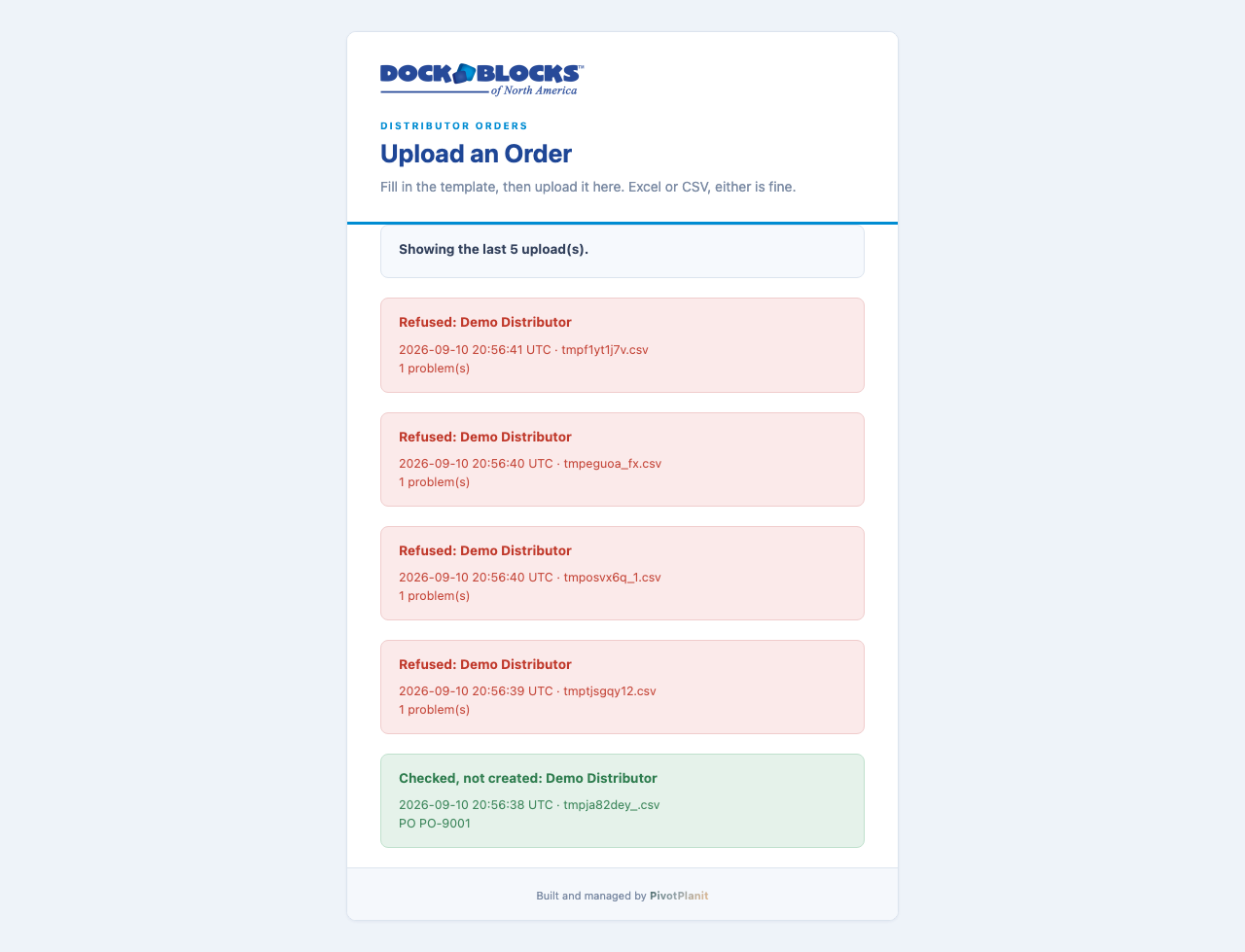
This is the one place that can answer “did a distributor try on Tuesday and get bounced,” because a refused upload never creates a Zoho order and would otherwise be invisible. We also keep the exact file a distributor sent, unchanged, so if a question ever comes up about what they actually submitted, we have it.
Decisions, and what you have redirected
Four calls, made so the system could ship. Two of them you have already redirected in your 11 September email, and they are marked as such.
| On your price list | Arrives as | Distributor price |
|---|---|---|
| Kayak Storage Rack - DB-029 | DB-029 | $819 |
| Full Connecting Pin - DB-006 | DB-006 | $6 |
| Half Connecting Pin - HFP-006 | HFP-006 (kept, not renumbered) | $5 |
| SKU | Size | Distributor price |
|---|---|---|
| KB-10 / KB-11 | 13.3 × 5 | $1,594 |
| KB-12 / KB-13 | 15 × 5 | $1,802 |
| KB-14 / KB-15 | 16.7 × 5 | $2,010 |
| KB-16 / KB-17 | 18.3 × 5 | $2,218 |
If an order ever does arrive with a tax figure typed into it, it is refused rather than guessed at, naming the order and the amount. Guessing a rate would put one number on the order and a different one on the invoice.
If any of these is not what you want, say so and we will change it. Each one is recorded on our side with the date, who decided it, and what would make us revisit it, so the answer does not depend on whoever is asked.
What we still need
What is not switched on yet
It has been proven once, on purpose. On 10 September we switched writing on, sent one order through a test distributor’s link, and read the result back out of Zoho: the right account, the right rep group, the dock kit broken into the parts the warehouse ships, and the total exact to the cent. Then we deleted that order and switched writing back off.
So the answer to “does it actually create the order” is yes, verified, rather than expected. Turning it on for real is one setting, and it is Matt’s call.
Where all of this lives
Two addresses, and they are deliberately different. One is for distributors and never asks anyone to log in. The other is George’s and always does.
| Who | Where | How they get in |
|---|---|---|
| A distributor Barbara at LFS, and whoever comes next | docks-distributor.nl.ds.ke | Their own private link. No login, ever. The link is the key, which is why each one is different and why it can be switched off on its own. |
| George and Alecia | dockblocks-distributor.pivotplanit.com /distributor/admin/ | Cloudflare emails a one-time code. No password to remember, no token to keep, and access is removed by taking the address off a list. |
The distributor address is not changing. Barbara has had hers since 1 September and a link already sitting in somebody’s inbox does not get to break because we tidied something up. Both addresses reach the same system.
George sees the board and can set up a distributor. He does not see the security log or the stored keys, and that is enforced by the server rather than by hiding buttons: a request for those simply does not come back with them.